Neuer Rechnungsprozess 21
Der Rechnungsprozess 21 umfasst von der Rechnungs- und Courtagenkontrolle über die Auslieferung der Rechnung an den Kunden bis zur Vermittlerabrechnung und Verbuchung in der Finanzbuchhaltung alle…
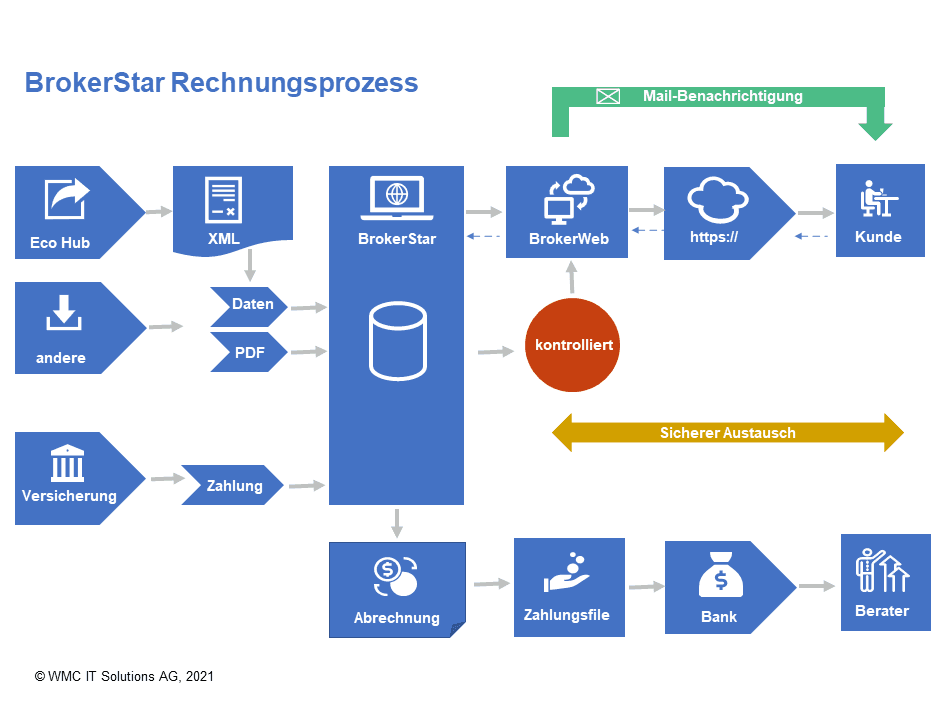
Der Rechnungsprozess 21 umfasst von der Rechnungs- und Courtagenkontrolle über die Auslieferung der Rechnung an den Kunden bis zur Vermittlerabrechnung und Verbuchung in der Finanzbuchhaltung alle Schritte. Dabei können je nach Bedürfnis verschiedene Varianten gewählt werden
Eingang der Rechnung
Rechnungen können auf folgende Arten angeliefert werden:
- Eco Hub / DXP
- One Broker
- Direkt durch Versicherer
- Manuelle Eingabe
Daten und XML
Man unterscheidet zwischen strukturierten Daten und Dokumenten. Eine XML-Datei kann sowohl Daten als auch PDFs enthalten. Beide werden vollautomatisch im BrokerStar abgelegt.
Rechnungskontrolle
Für die vollautomatische Kontrolle von Prämienrechnungen muss ein fix vorgegebener Ablauf im BrokerStar eingehalten werden: Sollstellung-Einlesen-Differenzhandling⇒ zur Courtagenkontrolle
Mail Benachrichtigung
Sobald die Rechnung kontrolliert und mit dem elektronischen Stempel "kontrolliert" versehen ist, erhält der Kunden eine Benachrichtigung zum Download der Rechnung im BrokerWeb.
BrokerWeb
Im Kundenportal erkennt der Kunde die neue Rechnung, die er downloaden kann. In diesem Fall entfällt der Postversand mit dem Begleitschreiben.
One Broker
Der Prozess zur automatisierten Rechnungsverarbeitung kann mit BrokerStar kombiniert werden. Neuste Technologie extrahiert Daten aus unterschiedlichen Quellen.
Vermittlerabrechnung
Wenn es Vermittler mit einem Provisionsanspruch gibt, können die Abrechnungen automatisch erstellt und die Zahlungen direkt ins E-Banking überführt werden.
Buchhaltung
BrokerStar führt eine offene Posten-Buchhaltung. Mit der FiBu-Schnittstelle werden buchhaltungsrelevante Transaktionen direkt in Programme von Sage oder Abacus übertragen.